This guide walks you through the steps from BepInEx installation to playing YAPYAP game with mods installed.
Install BepInEx
Before installing mods for YAPYAP, BepInEx must be installed into your game’s directory.
- Download the correct BepInEx build for your operating system (Windows, Linux or Mac). Download links: BepInEx 5 Mono or BepInEx 6 BE Mono. Install only one version (currently all available mods use BepInEx 5)!
- Extract the zip’s contents directly into the game’s root folder. That’s the same folder where the game executable (yapyap.exe) is located. Example: C:\Program Files\Steam\steamapps\common\YAPYAP.
- Run the game once. This creates essential files and folders.
- You should see the console running. If it does, it means the installation was successful and you can continue:
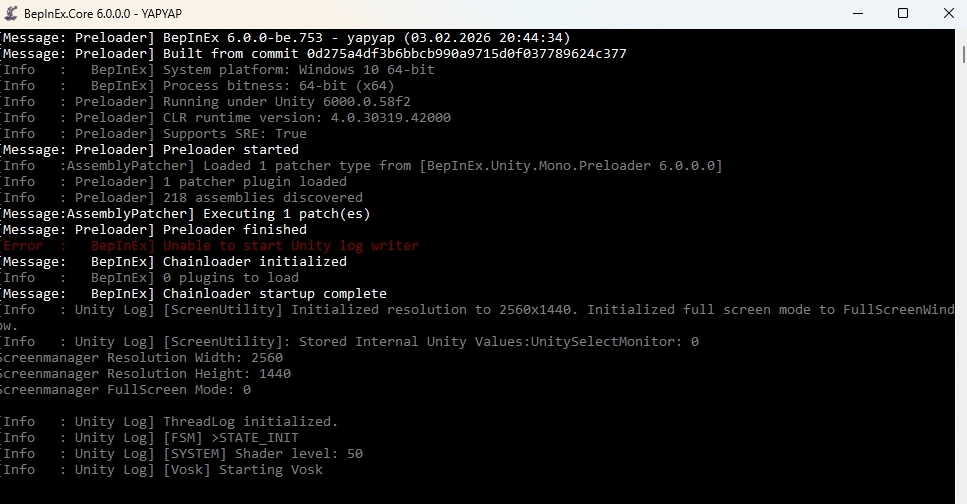
An example of BepInEx 6 Bleeding Edge console - After YAPYAP’s menu is loaded, exit the game and you can proceed to install mods.
Locate the Plugins Folder
Inside the BepInEx directory you’ll see:
BepInEx/
├── cache
├── config
├── core
├── patchers
└── plugins
└── LogOutput.log
The plugins folder is where you will place mod files. If it’s missing, something went wrong and you have to re-download BepInEx.
Download & Install Mods
Most YAPYAP mods are distributed as a .zip archive containing a single .dll file. Large mods may contain additional files and folders (images, sounds, levels, textures, etc.).
Download mods from reputable source such as yapyapmods.com. We have a large library of mods that are divided into several categories for ease of navigation. Before adding any mod to our website, we check whether it is virus-free and compatible with the latest game update.
After you have downloaded mod’s archive, simply unzip the downloaded file into BepInEx\plugins folder and start YAPYAP.
Note: some mods are server-side, meaning only the server (a player that creates and hosts the game) has to install them. Others are client-side, so every player will have to install them on their PC to see the difference.
Note 2: Some mods require additional frameworks or libraries to work. For example, Costume Texture Pack 1 requires More Colors in addition to BepInEx. All required libraries and frameworks are listed next to the Requires: section of the page, which is located slightly above the How to Install section:
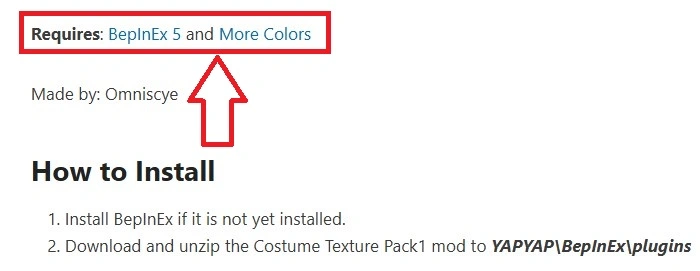
If there are any additional required libraries or frameworks, click on the name, download the archive, and install it. Installation instructions are provided on their respective pages, but usually you just need to place the .dll file in the plugins folder as well.
I you want to create mods yourself, this is a good guide to read.
How to Uninstall a Mod
Simply delete the .dll file (and all associated files/folders) from the plugins folder.
How to Uninstall BepInEx
To remove BepInEx, delete the following folders and files in the YAPYAP game’s folder:
- BepInEx folder
- .doorstop_version file
- doorstop_config file
- winhttp.dll file
This will completely remove any trace of the framework from the game.