Empress Spawn Browser for YAPYAP
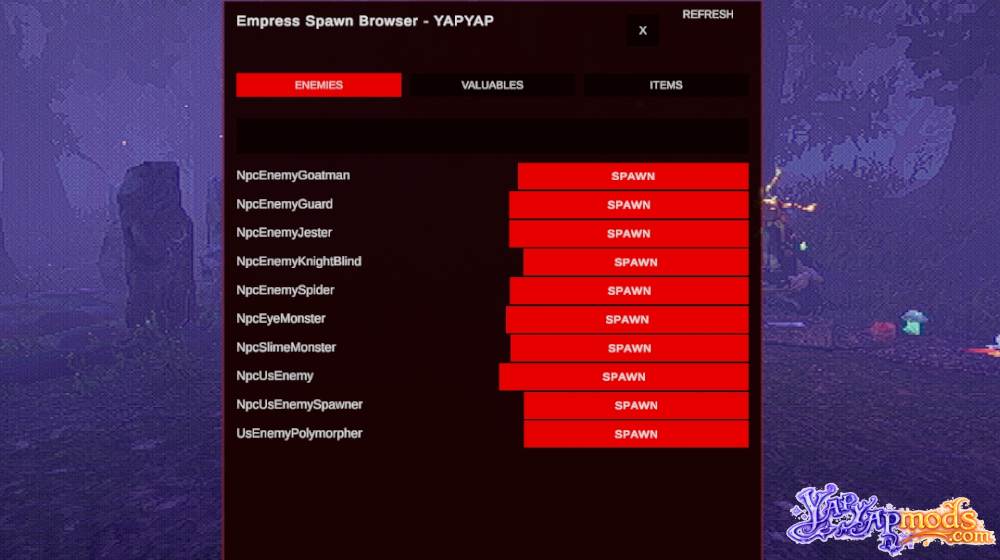
This spawn browser allows you to spawn items, enemies and valuable objects in YAPYAP!
Spawn Browser FEATURES
- In-Game Spawn Menu: Press your configured toggle key (Insert by default) to open the spawn window
- Tabbed Interface: Three clearly organized tabs for easy navigation:
- Enemies: Lists every enemy defined by the game; click Spawn to place one instantly
- Valuables: Displays all special valuable objects available for spawning
- Items: Shows all spawnable items in the game
- Instant Spawning: Spawn selected entities directly into the world with a single click
- List Refresh Button: Rebuilds all lists after a scene change or reload
- Configurable Toggle Key: Change the menu hotkey via config file
Controls & Configuration
- Toggle Menu: Insert (default; you can change the keybind in the config file)
- Refresh Lists: Refresh button inside the menu
- Config File: BepInEx/config/com.empress.spawnbrowseryapyap.cfg
The spawn browser in action (Spider spawn):
Requires: BepInEx 5
Made by: Omniscye
How to Install
- Install BepInEx if it is not yet installed.
- Download and unzip the Empress Spawn Browser to YAPYAP\BepInEx\plugins
If you have any problems installing this or any other mod for YAPYAP, read this guide.